> ## Documentation Index
> Fetch the complete documentation index at: https://mage-staging.mintlify.site/llms.txt
> Use this file to discover all available pages before exploring further.
# Overview
## Introduction
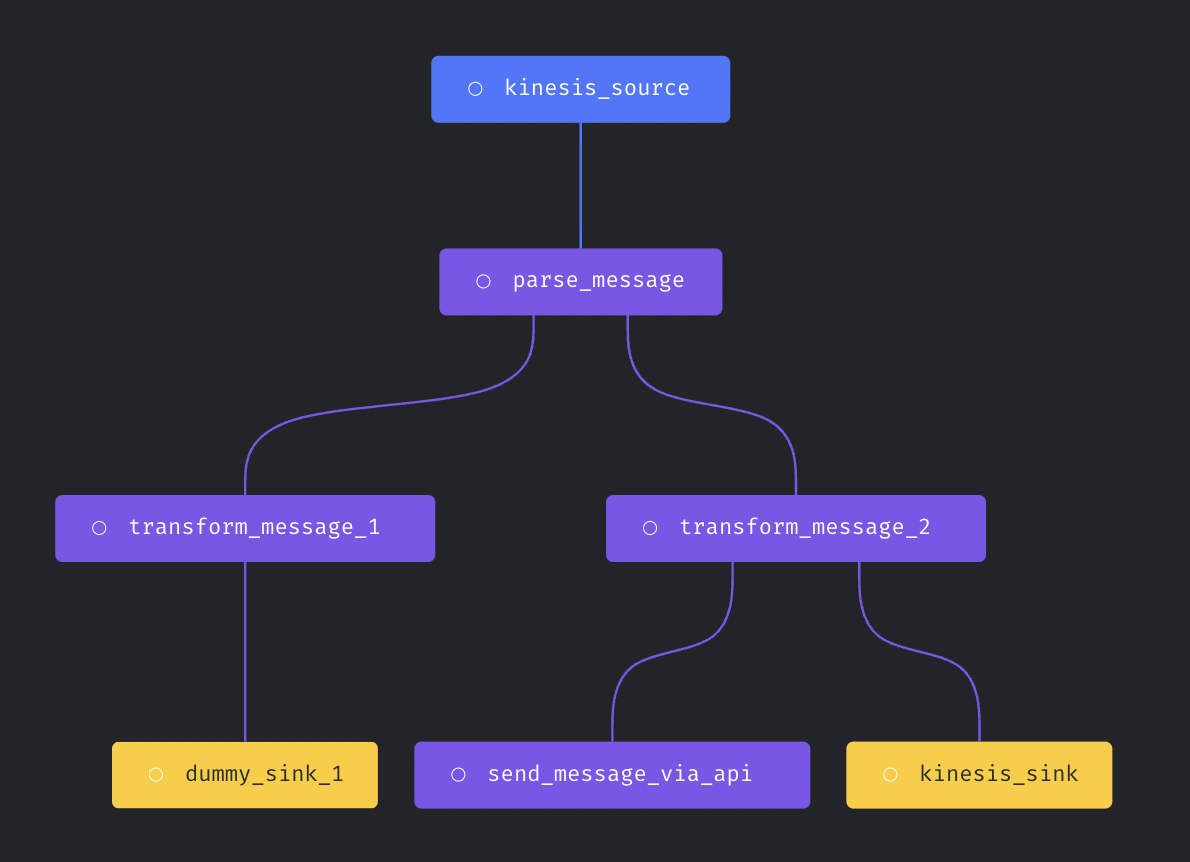
Each streaming pipeline has three components:
* Source: The data stream source to consume message from.
* Transformer: Write python code to transform the message before writing to destination.
* Sink (destination): The data stream destination to write message to.
Check out this [tutorial](/guides/streaming-pipeline#create-a-new-pipeline) to set up an example streaming pipeline.
In version `0.8.80` or greater.
You can build a streaming pipeline with one source, multiple transformers, and multiple sinks. Here is an example streaming
pipeline:
 ## Supported sources
* [Amazon SQS](/streaming/sources/amazon-sqs)
* [Azure Event Hub](/streaming/sources/azure-event-hub)
* [Google Cloud PubSub](/streaming/sources/google-cloud-pubsub)
* [Kafka](/streaming/sources/kafka)
* [Kinesis](/streaming/sources/kinesis)
* [RabbitMQ](/guides/streaming-pipeline-rabbitmq)
## Supported sinks (destinations)
* [Amazon S3](/streaming/destinations/amazon-s3)
* [BigQuery](/streaming/destinations/bigquery)
* [ClickHouse](/streaming/destinations/clickhouse)
* [DuckDB](/streaming/destinations/duckdb)
* [Dummy](/streaming/destinations/dummy)
* [Elasticsearch](/streaming/destinations/elasticsearch)
* [Kafka](/streaming/destinations/kafka)
* [Kinesis](/streaming/destinations/kinesis)
* [MongoDB](/streaming/destinations/mongodb)
* [Microsoft SQL Server](/streaming/destinations/mssql)
* [MySQL](/streaming/destinations/mysql)
* [Opensearch](/streaming/destinations/opensearch)
* [Postgres](/streaming/destinations/postgres)
* [Redshift](/streaming/destinations/redshift)
* [Snowflake](/streaming/destinations/snowflake)
* [Trino](/streaming/destinations/trino)
## Test pipeline execution
After finishing configuring the streaming pipeline, you can click the button `Execution pipeline` to test streaming pipeline execution.
## Run pipeline in production
Create the trigger in [triggers page](/design/data-pipeline-management#create-trigger) to run streaming pipelines in production.
### Executor count
If you want to run multiple executors at the same time to scale the streaming pipeline execution, you can set the `executor_count` variable
in the pipeline's metadata.yaml file. Here is an example:
```yaml theme={null}
blocks:
- ...
- ...
executor_count: 10
name: test_streaming_pipeline
type: streaming
uuid: test_streaming_pipeline
```
### Executor type
When running Mage on Kubernetes cluster, you can also configure streaming pipeline to be run on separate k8s pods by setting `executor_type`
field in the pipeline's metadata.yaml to `k8s`.
Example config:
```yaml theme={null}
blocks:
- ...
- ...
executor_type: k8s
name: test_streaming_pipeline
type: streaming
uuid: test_streaming_pipeline
```
## Contributing guide
Follow this [doc](contributing) to add a new source or destination (sink) to Mage streaming pipeline.
## Supported sources
* [Amazon SQS](/streaming/sources/amazon-sqs)
* [Azure Event Hub](/streaming/sources/azure-event-hub)
* [Google Cloud PubSub](/streaming/sources/google-cloud-pubsub)
* [Kafka](/streaming/sources/kafka)
* [Kinesis](/streaming/sources/kinesis)
* [RabbitMQ](/guides/streaming-pipeline-rabbitmq)
## Supported sinks (destinations)
* [Amazon S3](/streaming/destinations/amazon-s3)
* [BigQuery](/streaming/destinations/bigquery)
* [ClickHouse](/streaming/destinations/clickhouse)
* [DuckDB](/streaming/destinations/duckdb)
* [Dummy](/streaming/destinations/dummy)
* [Elasticsearch](/streaming/destinations/elasticsearch)
* [Kafka](/streaming/destinations/kafka)
* [Kinesis](/streaming/destinations/kinesis)
* [MongoDB](/streaming/destinations/mongodb)
* [Microsoft SQL Server](/streaming/destinations/mssql)
* [MySQL](/streaming/destinations/mysql)
* [Opensearch](/streaming/destinations/opensearch)
* [Postgres](/streaming/destinations/postgres)
* [Redshift](/streaming/destinations/redshift)
* [Snowflake](/streaming/destinations/snowflake)
* [Trino](/streaming/destinations/trino)
## Test pipeline execution
After finishing configuring the streaming pipeline, you can click the button `Execution pipeline` to test streaming pipeline execution.
## Run pipeline in production
Create the trigger in [triggers page](/design/data-pipeline-management#create-trigger) to run streaming pipelines in production.
### Executor count
If you want to run multiple executors at the same time to scale the streaming pipeline execution, you can set the `executor_count` variable
in the pipeline's metadata.yaml file. Here is an example:
```yaml theme={null}
blocks:
- ...
- ...
executor_count: 10
name: test_streaming_pipeline
type: streaming
uuid: test_streaming_pipeline
```
### Executor type
When running Mage on Kubernetes cluster, you can also configure streaming pipeline to be run on separate k8s pods by setting `executor_type`
field in the pipeline's metadata.yaml to `k8s`.
Example config:
```yaml theme={null}
blocks:
- ...
- ...
executor_type: k8s
name: test_streaming_pipeline
type: streaming
uuid: test_streaming_pipeline
```
## Contributing guide
Follow this [doc](contributing) to add a new source or destination (sink) to Mage streaming pipeline.