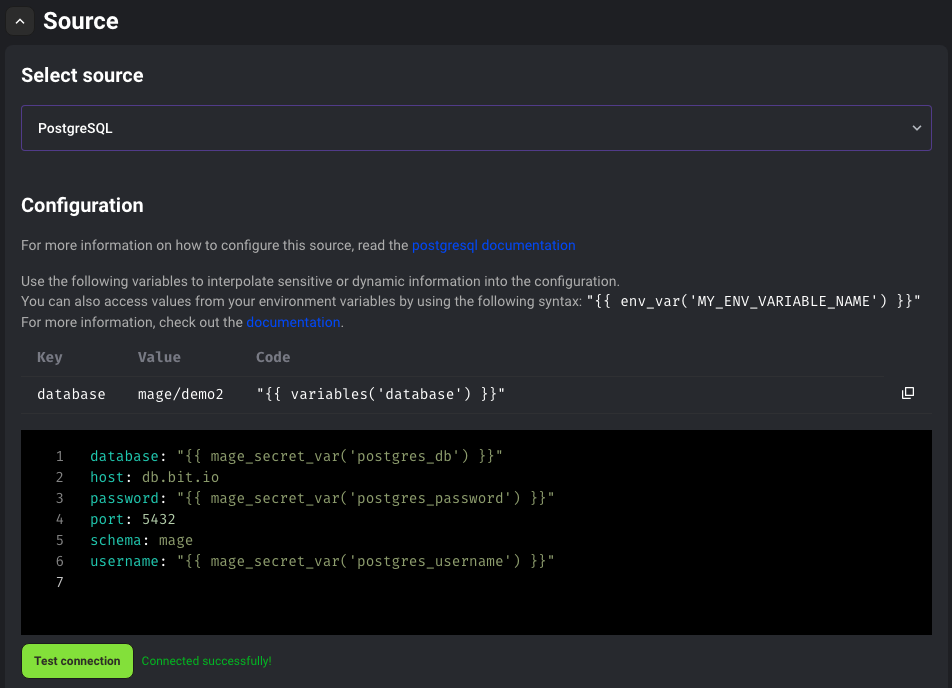
In various surfaces in Mage, you may be asked to input config for certain integrations such as cloud databases or services. In these cases, you may need to input a password or an api key, but you don’t want it to be shown in plain text. To get around this issue, we created a way to store your secrets in the Mage database.Documentation Index
Fetch the complete documentation index at: https://mage-staging.mintlify.app/llms.txt
Use this file to discover all available pages before exploring further.
Secret management
Creating secrets
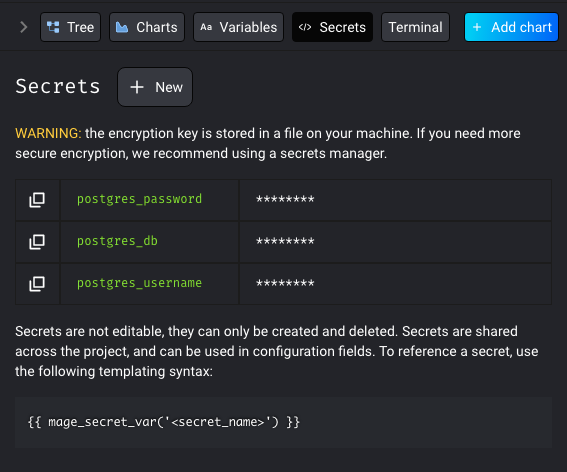
To manage your secrets, you’ll want to go to the edit page for a pipeline. In the sidekick, you should see aSecrets tab. To create a secret, press the New button on this tab.
Input a name for the secret and the value of the secret, and press Enter or Return to save.
Secrets in different environments
Secrets are stored to the Mage database. If you are using the same database across multiple Mage environments, i.e. development and production, the secrets will not be shared across the environments unless you shared the same Mage data directory for every environment. Each secret will be saved to the database with a name and a uuid. The name will be used to identify the secret, and the uuid is used to identify the environment. Example:| Name | Uuid | Value |
|---|---|---|
secret1 | dev-uuid | sooper dooper secret string |
secret2 | dev-uuid | xXxSecreTxXx |
secret3 | dev-uuid | dev only secret |
secret1 | prod-uuid | real production secret |
secret2 | prod-uuid | m4g3r0x! |
secret1 | random | random secret |
| Command | Development Value | Production Value |
|---|---|---|
get_secret_value('secret1') | sooper dooper secret string | real production secret |
get_secret_value('secret2') | xXxSecreTxXx | m4g3r0x! |
get_secret_value('secret3') | dev only secret | None |
- secrets scoped to a pipeline
Using Secrets
You can use the following syntax to have Mage interpolate the secret when reading from the config: